Automation in LINE UP! Metro Tycoon is most useful after you have a real network for it to manage. Start with a connected, runnable line, then turn on only the automation that supports your next target. The system can handle repetitive building, train management, station upgrades, repairs, city progression, missions, and movement, but it can also spend the money that you were saving for a specific unlock.
Start automation with a funded network
Your first automation target should be a working city network, not an empty map. Build at least one usable line, place trains on it, and check that the line can run before handing its budget to Auto Progress. Automation depends on the same underlying game objects as manual play: buildable track, stations that can be upgraded, trains that can operate, and cities with available progression. Stabilize the route with the line-planning basics before enabling broad spending.
Set one clear goal before enabling a broad automation option. Examples include finishing a line, preparing the next city unlock, improving the busiest stations, or keeping trains maintained while you are away from the controls. The current game information does not confirm a universal unlock level, price, paid requirement, or fixed interface location for Automation. Use the current in-game panel as the authority for what your account can enable.
Keep a reserve of Money for the next action you care about. Auto Build, Auto Buy Trains, Auto Stations, Auto Landmarks, Auto City Stage, repairs, and city unlocking can all compete for the same funds. A network that is earning money can still stall if several automatic systems spend the balance at once.
How automated Metro progress moves forward
Automation follows a repeatable management flow: select a target, let an enabled Auto function perform an eligible action, check the resulting network state, and redirect the next spend if the goal changes. It does not replace the need for a valid route. A train cannot be managed on a line that has no usable slot, and a line cannot be expanded where the map has no buildable section or the account lacks funds.
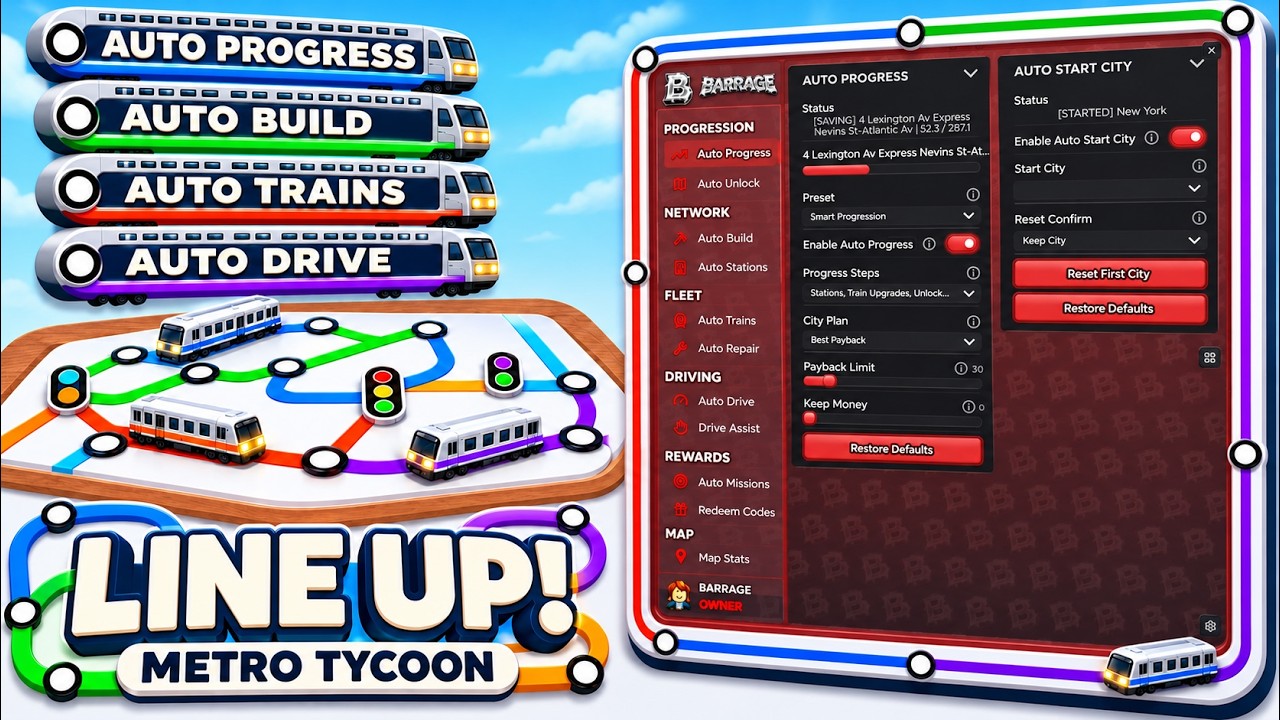
The city side and transport side advance together. Auto Build extends lines; Auto Buy Trains fills available train slots; Auto Stations improves stations; and Auto Repair addresses the trains in the worst condition. Auto City Stage, Auto Landmarks, and Auto Exchange then use city progress and funds to push development or the next unlock. The exact order and calculation behind those choices are not confirmed, so inspect the city and line panels after a meaningful purchase.
Watch Auto Progress manage Metro Tycoon development
This moment supports the overview of Auto Progress handling construction, train purchases, station upgrades, City Stage progression, landmarks, repairs, and city moves.
City movement is a separate decision from city unlocking. Auto Unlock City is described as prioritizing the next lowest-cost city that can be unlocked, while Auto Move City moves between cities and can return to the current target. Do not treat moving as proof that a city has been unlocked, or assume that networks merge when focus changes.
The system also covers player-facing activity. Auto Drive runs a train for income, Auto Conductor operates lines with fast stops, and Auto Ride boards and leaves trains for you. Auto Missions handles daily missions, Auto Like Cities performs the named city interaction, and Redeem Codes enters codes through the automation feature. These names describe the available functions; the current game interface should decide which tasks, rewards, or valid codes are available.
Automation controls and what they affect
Use the following map of functions to decide what to enable. Each row describes the supported role, the resource or object it changes, and the check to make before relying on it.
| Automation function | What it manages | Check before enabling |
|---|---|---|
| Auto Progress | Combines construction, trains, stations, City Stage, landmarks, repairs, and city moves | Confirm the broad spend matches your current goal |
| Auto Start City | Chooses the initial city | Review the selected starting city before development begins |
| Auto Unlock City | Prioritizes the next lowest-cost available city | Keep enough Money and confirm the target is actually available |
| Auto Move City | Moves between cities and returns to a target | Separate movement from unlocking and check the active city |
| Auto Build | Builds line sections | Choose the available payback, cheapest, or line-by-line strategy |
| Auto Stations | Upgrades busy stations | Check that station upgrades will not consume the next unlock reserve |
| Auto Buy Trains | Fills open train slots on lines | Confirm the line can use the added capacity and afford upkeep |
| Auto Upgrade Trains | Upgrades weaker trains | Inspect which trains are being prioritized |
| Auto Repair | Repairs the trains in the worst condition | Check that repair spending supports active service |
| Auto Train Models | Replaces trains with newer models | Verify a newer model is available and worth the spend |
| Auto Drive / Auto Conductor / Auto Ride | Drives, operates, or rides trains | Start with a running line and a valid destination |
| Auto Missions / Auto Like Cities | Handles daily missions or the city-like action | Use the live mission and city panels for goals and rewards |
| Redeem Codes | Enters and redeems codes | Use only a currently valid code shown by the game |
| Auto Exchange | Moves funds toward the next unlock target | Reserve money if the current city still needs repairs or upgrades |
This is a decision guide, not a promise that every function has the same unlock requirement. The most specific reported behaviors are that Auto Build can use best-payback, cheapest, or line-by-line choices; Auto Stations prioritizes busy stations; Auto Buy Trains fills lines; Auto Upgrade Trains targets weaker trains; Auto Repair targets the worst trains; and Auto Train Models selects newer models. Their exact ranking rules are not established, so verify the result rather than assuming “best” means best for your long-term plan.
Set up your first unattended run
Use this sequence when you want Automation to advance one city without losing control of the budget.
- Choose the city and target. Start in the city you want to develop and decide whether the target is a line extension, stronger service, City Stage progress, or the next city. The checkpoint is a visible target in the current city or automation panel; if there is no eligible target, stop before enabling broad automation.
- Verify a runnable line. Make sure a line has its required stations and at least one usable train slot. The checkpoint is an operating route rather than an empty construction plan. If the route cannot run manually, automation has nothing reliable to drive or conduct.
- Enable the narrowest useful control. Choose Auto Build for a line section, Auto Buy Trains for open capacity, Auto Stations for a station bottleneck, or Auto Repair for poor train condition. The transition is the first completed automatic action; do not enable every control just because it is available.
- Pick the spending rule where offered. Auto Build is described with best-payback, cheapest, and line-by-line choices. Select the rule that matches your target, then check the proposed section before confirming. “Best payback” is not defined well enough to replace your own route plan.
- Watch the first state change. After a build, purchase, upgrade, or repair, check the line, station, train condition, and remaining Money. The checkpoint is that the intended object changed and the route still has service capacity. If the wrong city or object changed, disable the control before another automatic spend.
- Add supporting train management. Once the line is longer or busier, use Auto Buy Trains to fill available slots, Auto Upgrade Trains for weaker vehicles, Auto Repair for the worst condition, or Auto Train Models when a newer model is available. Check both capacity and spending after each category is added.
- Choose city progression deliberately. Turn on Auto City Stage or Auto Landmarks only after the transport network can support the cost. If the next goal is a city unlock, Auto Exchange can direct funds toward it, but confirm that current repairs and service upgrades are not being starved.
- Run and verify the session. Auto Drive, Auto Conductor, and Auto Ride can handle train activity, while Auto Missions can handle daily objectives. Return to the city panel and confirm the active city, route condition, and balance. The evidence reports overnight or away-from-controls progress as a capability claim, but it does not establish an offline earnings limit or settlement rule.
- Decide whether to continue or move. Keep the automation active if the target is progressing without damaging service. Use Auto Move City only when you intentionally want to change focus, and use Auto Unlock City only when the available city and funds meet the current panel’s requirements.
Priorities when automation goes wrong
Automation is easiest to recover when you identify which resource or target changed first. Disable the broadest control before making a manual correction.
- Money falls faster than expected. Pause Auto Progress, Auto Landmarks, Auto City Stage, or Auto Exchange and leave only the control tied to the immediate goal. Recover by rebuilding a reserve, then inspect the next purchase in the current city panel before resuming.
- A line expands but cannot provide service. Stop Auto Build and check train slots, train condition, and the line’s runnable state. Recover with Auto Buy Trains or a manual capacity check, then extend the line only after the existing route is operating.
- The wrong city becomes active. Disable Auto Move City and confirm the active city before spending again. Recover by returning to the intended city through the current city interface; do not assume movement unlocked or merged the cities.
- Stations improve while the network remains weak. Pause Auto Stations and inspect the busiest route’s train capacity and condition. Recover by filling useful train slots, repairing vehicles, or improving the constrained line before buying more station levels.
- Train expenses keep rising. Pause Auto Buy Trains, Auto Upgrade Trains, or Auto Train Models and compare the number and condition of vehicles with the line’s actual needs. Recover by keeping only the train-management function that solves the visible bottleneck.
- A city or stage does not advance. Check the live requirement and available funds rather than guessing an unlock threshold. Recover by completing the missing construction, service, or spending requirement shown in-game, then retry the narrow automation control.
- A daily task or code action does not complete. Open the current mission or redemption panel and follow its displayed requirement. Recover only with a currently accepted task or code; Automation’s feature name does not confirm that every code remains valid or that every reward is available.
The safest long-term pattern is narrow automation first, verification second, and broad Auto Progress last. Keep the route earning, protect a reserve for the next meaningful unlock, and treat every reported priority rule as something to confirm in the live game panel before letting it spend repeatedly.
First-time LINE UP! Metro Tycoon automation questions
Is Auto Like Cities the same as Auto Unlock City?
No. Auto Like Cities performs the named city interaction, while Auto Unlock City selects an available city to unlock, with the reported preference for the lowest cost. They are separate automation functions with different outcomes.
Does the Redeem Codes automation provide working codes?
No. It describes an automatic code-entry action, not a guarantee that a code is active or that a reward is available. Check the current redemption panel and use a code that the game currently accepts.